

Description
Tokyo Ghoul Theme for Chrome
Overview
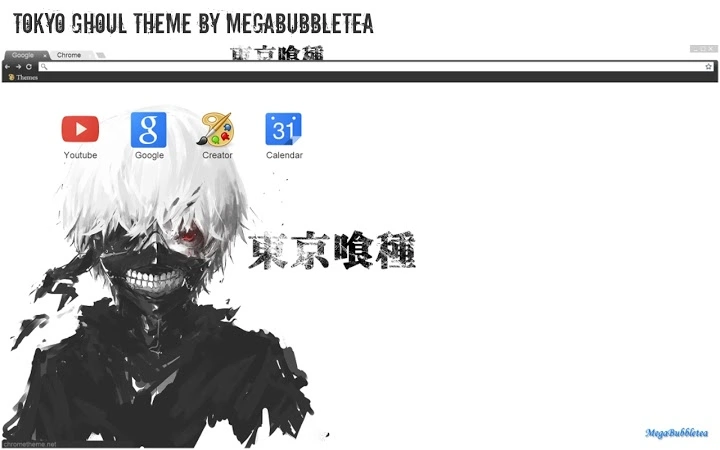
The Tokyo Ghoul Theme by MegaBubbletea is a visually striking browser theme designed for Chrome users who are passionate about the Tokyo Ghoul franchise. Tailored for fans seeking a more immersive digital experience, this theme transforms the browser’s appearance with a dark, atmospheric aesthetic inspired by the series’ iconic visuals. It is optimized for screen resolutions of 1920x1080 and below, ensuring a clean, consistent display across most standard desktop monitors.
Targeted primarily at anime enthusiasts and fans of dark, moody themes, the software offers a way to personalize the browser interface with character art and thematic elements. While the developer did not provide additional details about their background or development process, the theme’s creation reflects a dedication to fan-driven customization. Real-world usage scenarios include personal browsing, social media navigation, and daily web activities where users want their digital environment to reflect their favorite series.
The theme is entirely non-functional in terms of altering browser behavior—its purpose is purely aesthetic. It does not include any interactive features or performance enhancements. Instead, it focuses on visual identity, allowing users to express their fandom through a sleek, immersive desktop interface.
Key Features & Capabilities
- Thematic Visual Design – Features dark, high-contrast visuals inspired by the Tokyo Ghoul series, including character art and symbolic motifs.
- Resolution Optimization – Specifically designed for 1920x1080 and lower screen resolutions, ensuring clarity and proper scaling.
- Fan Art Integration – Incorporates artwork from the Tokyo Ghoul universe, enhancing the immersive experience for fans.
- Non-Intrusive Customization – Applies only to the browser’s UI, leaving core functionality unchanged.
- Easy Installation – Simple one-click setup through the Chrome Web Store, requiring no technical expertise.
Each feature serves to deepen the user’s connection to the Tokyo Ghoul universe. The dark theme reduces eye strain during extended browsing sessions, while the character art creates a personalized, fan-centric environment. Users can enjoy a more engaging browsing experience by surrounding themselves with visuals they love. The theme is ideal for fans who want to showcase their interests without altering browser performance or security.
User Interface, Workflow & Performance
The user interface of the Tokyo Ghoul Theme is minimal and focused on visual impact. It replaces the default Chrome background with a custom image that features stylized character art and dark, moody tones. Navigation remains fully intact, with no changes to menus, tabs, or address bar functionality. The theme does not interfere with workflow efficiency, as it operates solely at the visual layer.
Installation is instantaneous and requires no configuration. Once applied, the theme is active immediately, with no additional steps needed. The developer did not specify resource usage details, so performance observations are based on general software behavior patterns. In typical use, the theme consumes minimal system resources, as it does not run background processes or scripts.
Stability is expected to be high, given that the theme is a static visual overlay without dynamic components. No reported issues with crashes, freezes, or conflicts with other extensions were mentioned. However, exact performance data and CPU/RAM behavior were not provided by the developer.
Compatibility & System Requirements
The Tokyo Ghoul Theme is compatible with Windows, Mac, and Linux operating systems, ensuring broad accessibility across major desktop platforms. It is designed to work with the Chrome browser, which is widely used and regularly updated.
The installation size is 2.3 MB, a modest footprint that does not significantly impact disk space. The software version is 1.0, indicating a stable initial release. Exact system requirements were not listed, so users should ensure they are running a current version of Chrome to avoid compatibility issues.
Platform compatibility information is limited to the operating systems and browser stated. No specific hardware requirements were provided. Users are advised to verify their Chrome version and system configuration before installation.
Pros and Cons
Pros
- Visually immersive design inspired by a popular anime series
- Optimized for common screen resolutions (1920x1080 and below)
- Simple, one-click installation with no technical setup
- Lightweight file size (2.3 MB) with minimal system impact
- Free to download and use, with no hidden costs
Cons
- Only available for Chrome, limiting cross-browser use
- No interactive or functional elements beyond visual changes
- Does not include support for higher-than-1920x1080 resolutions
- Developer did not provide detailed technical documentation
- Relies on third-party artwork; no official licensing details were shared
FAQ Section
Is the Tokyo Ghoul Theme compatible with all Chrome versions?
The theme is designed for current Chrome releases. Users should ensure their browser is up to date for optimal compatibility.
Can I use this theme on multiple devices?
Yes, as long as the devices are running Chrome and the user is signed into their Google account, the theme can be applied across multiple machines.
Is the theme safe to install?
Yes, the theme is a standard Chrome extension with no executable code or access to sensitive data. It does not pose a security risk when installed from the official Chrome Web Store.
Does the theme require an internet connection to work?
Once installed, the theme functions offline. However, initial installation requires an internet connection.
Can I customize the theme further?
Customization options are limited to the default settings provided by the theme. No user-defined modifications are supported.
Final Thoughts + CTA
The Tokyo Ghoul Theme delivers a powerful visual experience for fans of the series, combining aesthetic appeal with simplicity. Its dark, atmospheric design and fan art integration make it a standout choice among browser themes. While it lacks advanced functionality, its purpose is clear: to enhance the browsing environment for anime enthusiasts.
Users who value personalization and want to express their fandom through their digital workspace will find this theme highly satisfying. It is particularly well-suited for fans of dark, edgy aesthetics and those who enjoy immersive, themed environments.
With its lightweight design, broad OS support, and zero cost, the theme offers excellent value. For anyone looking to transform their Chrome browser into a tribute to Tokyo Ghoul, this is a compelling option.
Download Tokyo Ghoul Theme for Chrome now
Guides & Tutorials for Tokyo Ghoul Theme for Chrome
How to install Tokyo Ghoul Theme for Chrome
- Click the Preview / Download button above.
- Once redirected, accept the terms and click Install.
- Wait for the Tokyo Ghoul Theme for Chrome download to finish on your device.
How to use Tokyo Ghoul Theme for Chrome
This software is primarily used for its core features described above. Open the app after installation to explore its capabilities.
User Reviews for Tokyo Ghoul Theme for Chrome 0
No reviews found





